
OurFamilyWizard Co-Parent App
OurFamilyWizard, LLCParenting
4.52.07K Reviews
- Version
- 2026.11.1
- Installs
- 500.00K
- Age Rating
- Everyone
Screenshots



Our Review of OurFamilyWizard Co-Parent App
 Analysis by Appyee
Co-parenting often asks two households to stay coordinated even when a conversation is tense, a plan changes at short notice, or a child’s school week is already full. I see OurFamilyWizard Co-Parent App as a shared place to keep those practical details together rather than scattering them across texts, email, and memory. It is a parenting app from OurFamilyWizard, LLC, aimed at parents who need a clearer routine for communicating and organizing care.
When two households need one working plan
The app makes the most sense when both parents are willing to use a common system. A calendar can show the schedule, messages can keep decisions in one thread, and shared expense records can make money conversations more specific. Those tools do not resolve disagreements by themselves, but they can reduce the number of small coordination problems that grow when each household is working from a different version of the plan.
For example, imagine a school-day handoff when one parent learns that pickup arrangements have changed. The useful workflow is to send the update through the shared communication channel, check that the calendar reflects the plan, and leave a note if there is a detail the other household will need later. The outcome is not perfect agreement; it is a clearer record of what was communicated and a better chance that the child’s day continues without adults relying on an old text.
Working through a typical week
I would start by using the calendar for recurring handoffs and known appointments, then add changes as they come up instead of leaving them in a separate message history. Before a busy week, a quick calendar check can reveal an overlooked event or a clash between plans. That small habit is more useful than treating the app as a place to visit only after something has gone wrong.
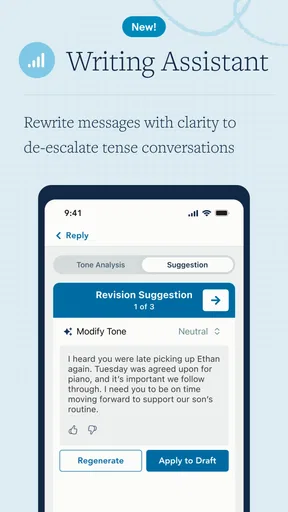
Messages work best when they are concrete: state the decision needed, include the relevant timing, and keep unrelated concerns out of the same conversation. The tone meter may encourage a calmer wording, but it cannot decide what is fair or make a difficult subject easy. I’d treat it as a prompt to pause and reread, not as a substitute for judgement or a guarantee that the exchange will stay constructive.
For shared costs, logging an expense while the receipt or amount is in front of you is a practical habit. It avoids trying to reconstruct a purchase weeks later, when each parent may remember it differently. A journal entry is better suited to details worth retaining for later, such as a child’s milestone or a note that may help with a future conversation. Keeping those uses distinct makes the shared space easier to scan.
Handoffs, records, and everyday friction
The app’s strongest idea is that a schedule, a conversation, and the related follow-up can sit in one co-parenting workspace. That is different from using a general family calendar alone: the calendar may show when a handoff happens, while the message history can hold the discussion that led to a change. For practical matters, that connection can save time and reduce “which version did we agree on?” moments.
Still, a shared tool only helps when both people keep it current. If one parent continues to make plans in ordinary texts and the other relies on the app, information can split across channels again. Some families may also find a dedicated co-parenting workspace too formal for straightforward arrangements. If a simple shared calendar and occasional messages already work reliably, moving everything into a separate app may add more routine than value.
The app is free to install, and its store profile shows a 4.5 average from around 13,000 ratings, with more than 500,000 installs. It is rated for Everyone and has been available since 2012. The current version is 2026.1.1, and in-app purchases range from about $150 to $300 per item, so I would check the terms carefully with the other parent before building a routine around paid access. Those costs matter most when both households need to participate; agree on who will cover what before a disagreement about the app itself becomes another shared expense.
Who is likely to get the most from it
I’d recommend considering it when co-parenting involves frequent schedule changes, recurring reimbursements, or a need to keep decisions in a consistent record. It may also suit parents who want a more focused place for child-related coordination than a general messaging app provides. The store summary says more than a million parents and professionals have used the service, but the important question for an individual family is simpler: will both adults actually use the same workflow?
It is less compelling if communication is already calm and predictable, if the other parent will not participate, or if either person needs a tool mainly for private planning rather than shared coordination. It should not be treated as a mediator, legal adviser, or replacement for a direct conversation when a sensitive decision needs one. A centralized record can clarify what was said; it cannot ensure that both people interpret it alike.
A more organized routine, if both parents commit
First things first, downloading the OurFamilyWizard Co-Parent App is a breeze. Available on both Android and iOS, the installation process is quick and straightforward. Once you’ve got it on your device, the setup process walks you through creating an account and linking with your co-parent. The app respects the sensitive nature of its users' data, ensuring everything remains private and secure.
User Interface and Experience
One of the first things I noticed about the app is its sleek and intuitive interface. Everything is laid out in a way that makes sense, even if you’re not the most tech-savvy parent out there. Navigating through the different sections is smooth, and the design is clutter-free, making the experience enjoyable rather than daunting.
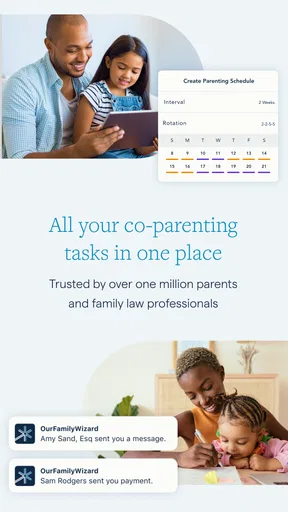
There’s a handy color-coded calendar that allows both parents to schedule and view upcoming events. This feature is a lifesaver for avoiding those "I thought it was your weekend" moments. The notifications are timely, ensuring you never miss an important update.
Features that Stand Out
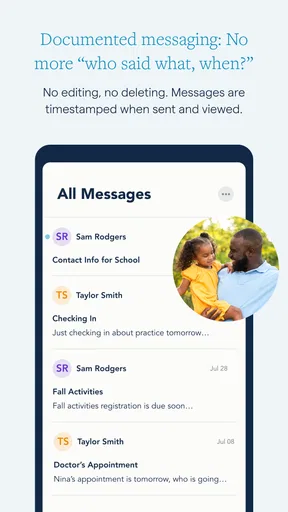
The app’s features are where it truly shines. The messaging tool is a secure channel for discussing everything from pick-up times to medical appointments. It’s great knowing that all conversations are archived and can be referenced if needed.
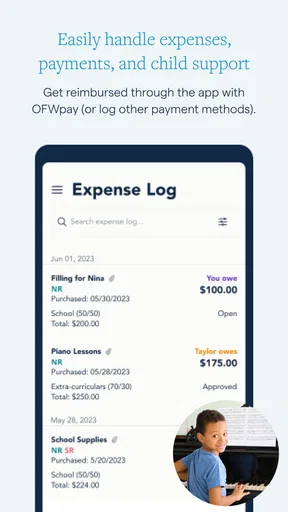
Expense tracking is another feature that makes life easier. You can log shared expenses and request reimbursements directly through the app. No more scrambling for receipts or trying to remember who paid for what. The app does the heavy lifting for you.
Another cool feature is the journal. This allows you to jot down notes, thoughts, or anything you might want to share later with your co-parent. It’s a great way to keep track of important details or milestones in your child’s life.
Making Communication Easier
We all know that communication can sometimes be the trickiest part of co-parenting. The app’s tone meter is a feature that caught my attention. It helps you maintain a positive and constructive tone in your messages, which can be incredibly useful in reducing misunderstandings and conflicts.
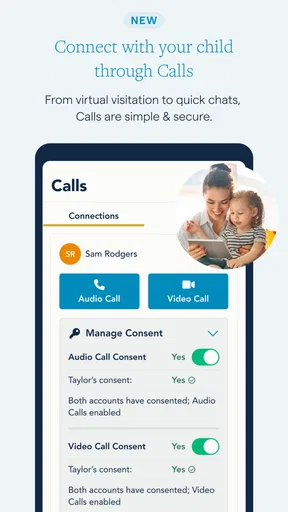
Having a centralized hub for all communication means less chance for things to get lost or misinterpreted. The ability to send messages, photos, and even voice notes ensures that you can communicate in the way that feels most comfortable for you and your co-parent.
Building habits that make the tools useful
A useful approach is to settle on a few shared conventions before the calendar fills up. For instance, decide whether a calendar entry means a confirmed plan or a proposal, and agree on how to flag a change that needs a response. Without that distinction, a new event can create uncertainty rather than remove it. I would also keep each message focused on one decision where possible; a clear pickup question is easier to answer than a long note mixing transport, costs, and an old disagreement.
For expenses, consistency matters more than writing a detailed account after the fact. Add the item promptly, include enough context for the other parent to recognize it, and keep the related request with the expense rather than reopening the issue in a separate channel. This makes follow-up less dependent on either person remembering a conversation. It also exposes a trade-off: the more meticulously both parents log routine spending, the more complete the record becomes, but the process can feel burdensome if the family rarely needs that level of tracking.
Photos and voice notes can be convenient when typing is awkward, but they are not automatically clearer than a short written message. For a handoff change or a reimbursement request, I’d use plain wording that leaves little room for interpretation. A photo may help illustrate a child-related detail; a voice note may carry warmth, but can be harder to skim later. Choosing the format based on the job makes the shared history more usable.
Where a dedicated co-parenting app differs
The usual alternative is a mix of text messages, a shared calendar, and perhaps a spreadsheet or payment app for costs. That mix can be perfectly adequate for parents who communicate comfortably and have few changes to manage. Its weakness is fragmentation: a schedule may be in one place, the explanation for a change in another, and the expense record somewhere else. This app’s appeal is bringing those co-parenting tasks into a single setting, rather than offering a general-purpose calendar or chat experience.
That consolidation has a cost in effort. Both parents need to check and maintain the shared space, and a formal record may feel less natural than a quick text for families with easy communication. It is not automatically better simply because it is purpose-built. If the main problem is remembering appointments, a shared calendar may be enough; if the recurring difficulty is keeping child-related messages and expenses organized between households, a dedicated workspace is easier to justify.
Before switching, I would talk through what each parent expects to put there and how urgent changes will be handled. The app can organize the record, but parents still need an agreed way to respond when a child needs an answer quickly. Keeping a backup routine for urgent contact avoids assuming that a notification alone settles a time-sensitive matter.
Questions worth settling before relying on it
Can one parent use it without the other? The value described here comes from shared coordination, so a one-sided setup is unlikely to replace the current back-and-forth. If the other parent is reluctant, begin by identifying one concrete pain point—such as schedule changes or shared costs—and discuss whether both adults will use the same process. If there is no willingness to participate, a tool that both already check may be the more practical choice.
Does it replace every other way of contacting a co-parent? I would not assume that. A shared workspace is useful for routine plans and records, while urgent situations may call for whatever direct contact method both parents have agreed to use. Likewise, an archived conversation can help someone revisit what was discussed, but it does not replace careful wording, calm boundaries, or professional support when communication has become unmanageable.
Is the free download the whole cost? The app is listed as free, while in-app purchases are available at the stated price range. I would review the purchase details and decide together whether the paid option is necessary for the family’s intended use before entering records that both households will rely on. That conversation is especially important if one parent expects the other to share a cost or if access arrangements are a point of tension.
There is also a practical question of fit: will the family benefit from a detailed shared record, or will maintaining it become another source of conflict? A simple trial of the agreed routine can reveal whether both parents check the calendar, keep expense entries current, and use the messaging space consistently. If the habit does not stick, the app’s tools cannot compensate for the missing participation.
Why You’ll Love It
Using the app has made managing co-parenting tasks feel less like a chore and more like a collaborative effort. It’s like having a personal assistant dedicated to keeping your co-parenting journey smooth and organized. OurFamilyWizard helps reduce stress, save time, and improve communication, which is a win-win for everyone involved.
Whether you’re just starting out on your co-parenting journey or you’ve been at it for a while, this app offers something valuable. It’s thoughtfully designed with the unique challenges of co-parenting in mind, making it a tool worth considering.
If you’re ready to give it a try, you can download it from the App Store or Google Play. Trust me, once you start using it, you’ll wonder how you ever managed without it. Happy co-parenting!
My recommendation is more measured: this is worth considering when both households want a single, child-focused place for plans, messages, and shared expenses. I would not choose it just because co-parenting is difficult; I would choose it when the particular difficulty is losing track of practical details across separate channels. If both parents commit to a simple routine and agree how they will handle changes, the app can make everyday coordination more orderly. If that shared commitment is missing, a simpler tool they both already use may serve the family better.
Privacy and Permissions
See what permissions an app requests and how it handles your data.
- Location
- approximate location (network-based), precise location (GPS and network-based)
- Phone
- read phone status and identity
- Photos/Media/Files
- read the contents of your USB storage, modify or delete the contents of your USB storage
- Storage
- read the contents of your USB storage, modify or delete the contents of your USB storage
- Camera
- take pictures and videos
- Microphone
- record audio
- Wi-Fi connection information
- view Wi-Fi connections
- Device ID & call information
- read phone status and identity
- Other
- view network connections, pair with Bluetooth devices, change network connectivity, full network access, change your audio settings, run at startup, control vibration, prevent device from sleeping
Verdict
Strengths of OurFamilyWizard Co-Parent App
- Easy-to-use interface enhances user experience.
- Shared calendar keeps everyone on the same page.
- Secure messaging ensures privacy and confidentiality.
- Expense tracking simplifies financial management.
- Access to professional resources supports co-parenting.
Limitations of OurFamilyWizard Co-Parent App
- Subscription required for full feature access.
- Limited customization for notifications.
- No offline mode available for remote areas.
- Some features have a learning curve.
- May require both parents' cooperation for effectiveness.
Similar Picks in This Category
View All
Family Space
Motorola Mobility LLC.3.9

شرطة الأطفال - مكالمة وهمية
Oub Apps4.1

Findmykids: Parental Control
LETEM LTD4.6

Pregnancy + | Tracker App
Philips Electronics UK Limited4.8

Policía de niños - para padres
Kids police4.7

Pregnancy App
Amila4.9
Frequently Asked Questions
What is OurFamilyWizard and how does it benefit co-parents?
OurFamilyWizard is a comprehensive app designed to facilitate communication and coordination between co-parents. It offers features such as shared calendars, expense tracking, and secure messaging. The app aims to reduce conflict and improve collaboration by providing a single platform for managing schedules, finances, and communication.
Is OurFamilyWizard secure for sharing personal information?
Yes, OurFamilyWizard prioritizes user security and privacy. It uses advanced encryption to protect your data and offers features like two-factor authentication to ensure only authorized users can access sensitive information. This makes it a reliable tool for managing personal and family-related details without worrying about security breaches.
What devices support the OurFamilyWizard app?
OurFamilyWizard is available on both Android and iOS platforms, making it accessible on a wide range of smartphones and tablets. Additionally, users can access the app via a web browser on any computer. This cross-platform compatibility ensures you can stay connected and organized regardless of your device preferences.
Are there any costs associated with using OurFamilyWizard?
Yes, OurFamilyWizard requires a subscription. It offers several plans to cater to different needs, including an annual subscription option. While it is a paid service, many users find the investment worthwhile due to the peace of mind and efficiency it brings to co-parenting arrangements. There are often promotions or discounts available for new users.
How does OurFamilyWizard help in legal situations involving co-parenting?
OurFamilyWizard is often recommended by family law professionals due to its ability to maintain thorough and organized records of communication, expenses, and schedules. This documentation can be crucial in legal situations or disputes, providing a clear, unbiased history of interactions and agreements between co-parents.
